Wallet and token operators
Review the supported wallet, transfer and liquidity operations for your installed release.
Get Started with FRBAI trading agents. Local execution. Your control.
Turn trading instructions into structured workflows with AI chat and agents. Coordinate wallets, token operations and private bundles across EVM and Solana from your Windows workspace. Review the plan, set your limits and approve local execution.
From a conversation to a plan you can review, approve and run.
Windows 10/11 · 64-bit
Published SHA-256 checksum
Verify · Install · Pair
Follow a task from conversation to local signing and the submission lifecycle.
Start with your goal. The conversation captures the task, not your private keys.
Workspace screenshot with sensitive values redacted. Displayed values are not evidence of returns or a live connection.
A visual map of the conversation, operation plan and local execution boundary.
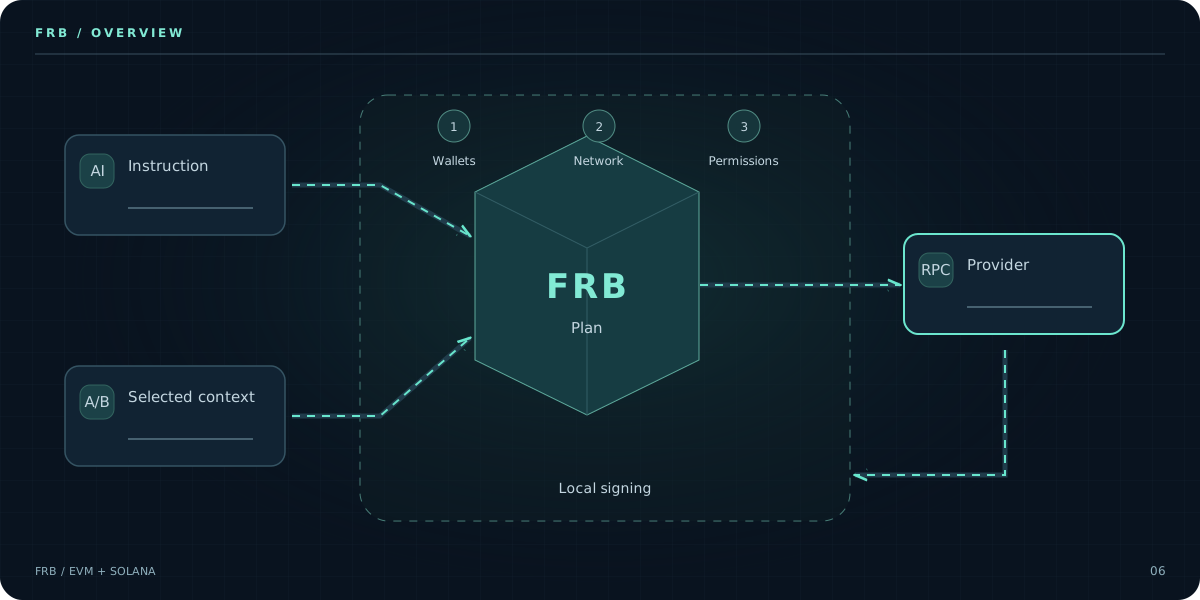
Static overview. Open the walkthrough to explore each stage.
A plain-language instruction opens a reviewable workflow. Missing context stays visible.
Wallets, network and provider configuration attach to the same operation plan.
Review permissions, destinations, fee settings and the proposed sequence.
Approval is an explicit boundary, not a side effect of sending a chat message.
AI assistance, local transaction signing and external routing are different trust boundaries.
A receipt is examined for its actual state. A provider accepting a request is not proof of confirmation.
Plan generation is not a signature. Provider acceptance is not confirmation. Review the actual result before retrying.
Build Your WorkflowReview the supported wallet, transfer and liquidity operations for your installed release.
Get Started with FRBKeep signing local while configuring the providers and transaction paths your workflow requires.
Get Started with FRBInspect route settings and submission outcomes without treating simulation as a guarantee.
Get Started with FRBFrom a single bundle to a network of wallets. Follow the path of your next operation.
Prepare related operations in one reviewable submission workflow.
Keep wallet context and task status clear when operating several addresses.
Prepare repeated asset transfers with explicit source and destination review.
Manage pool operations through one local preparation and review workflow.
Bring token-entry configuration, local key signing, and execution approval into your local workspace with verified non-custodial Solana tooling.
Consolidate assets from multiple wallets while keeping destinations and task outcomes visible.
Keep signing on your Windows device and control the provider used by each workflow.
Start with the dashboard and requirements that match your network.
Configure supported operations on Windows, review the transaction path, sign locally and follow the submission result.
A submitted request is not a confirmed transaction. Availability depends on your release, network and provider; inclusion and returns are not guaranteed.
Get Started with FRBGive the agent a specific goal and the wallet and network context it needs. Resolve missing inputs before moving on.
Keep amounts, destinations, permissions and execution limits explicit. Review the proposed actions instead of granting an open-ended mandate.
Inspect preparation and simulation separately from approval, local signing and submission. Check each returned outcome.
Review chain ID, wallet permissions, nonce, gas and the configured RPC or private-submission provider. Flashbots routes depend on chain and provider support.
Review accounts, token programs, blockhash validity, fees and the selected RPC or Jito route. Bundle acceptance, inclusion and confirmation are different states.
Local transaction signing and AI inference are different boundaries. Review the AI provider and what context it receives. Keep private keys, seed phrases and provider credentials out of chat. Protect your Windows device and verify every operation before approval.
Use an EVM wallet and the RPC/provider required by the selected chain and operation. Private submission depends on the provider and route you configure.
Get started with EVMUse a Solana wallet, Solana RPC and the provider required by the operation. Jito bundles and Pump.fun workflows have their own route and account requirements.
Get started with SolanaNo. Check the installed release, configured provider and operation requirements. Network support does not imply support for every route or strategy.
FRB is designed for local signing. Never share a seed phrase on this website. Device security, permissions and transaction review remain your responsibility.
The Windows download has no required subscription. A 20% fee applies to qualifying net profitable executions where the fee logic applies. Gas, slippage, failed transactions and market losses remain possible.
Windows 10 or 11 (64-bit), .NET Framework 4.8 and the network access required by your configured providers. Install the agent and use its six-character pairing code in the matching dashboard.
The FRB Agent runs on your Windows machine so signing and strategy configuration remain under your control. Review permissions, telemetry, and release hashes before use.
Some hosted bots require credentials or signing authority outside your device.
Requests may pass through a hosted service before reaching an RPC or relay.
A hosted operator may be able to observe configuration or order intent.
Availability and update safety depend on the service operator.
Review custody and permissions
Signing remains on the user-controlled device; never enter a seed phrase into the website.
Connect to selected RPC and relay providers without a hosted custody layer.
Review the telemetry policy to understand and control diagnostic data.
Windows releases include a published SHA-256 hash for integrity checking.
Local, user-controlled workflow
Common questions about running the FRB Agent
Choose EVM or Solana, install the Windows agent and connect it to the matching dashboard.
Get Started with FRB