Safe start journey
Your setup checklist
This checklist records navigation on this device. It does not verify installation, an agent connection or a completed transaction.
- 1NextDownload agentDownload the Windows installer and verify its published SHA-256.
- 2NextInstall and openRun the installer, then open FRB Agent and wait for the pairing PIN.
- 3NowPair deviceEnter the 6-character PIN in the correct chain dashboard.
- 4NextLaunch dashboardOpen the matching dashboard and confirm the agent connection before using an execution route.
Next recommended step
Download agent
Download the Windows installer and verify its published SHA-256.
We track progress locally so you can pick up where you left off.
Open Download agentThis checklist records navigation on this device. It does not verify installation, an agent connection or a completed transaction.
Stage 3 of 4
Activate your FRB agent
Open the matching dashboard, sign its wallet login message and pair the six-character PIN shown by your Windows agent. Check the actual connection status afterward.
Use the dashboard for your selected network. Wallet login and agent pairing are separate steps.
Choose how to continue
New to FRB? Start with guided setup and Simulation Mode. If the agent is already installed, use the dashboard link inside your chosen network.
Launch FRB Agent
Open FRB Agent on your Windows device and keep it running while you complete pairing in the selected dashboard.
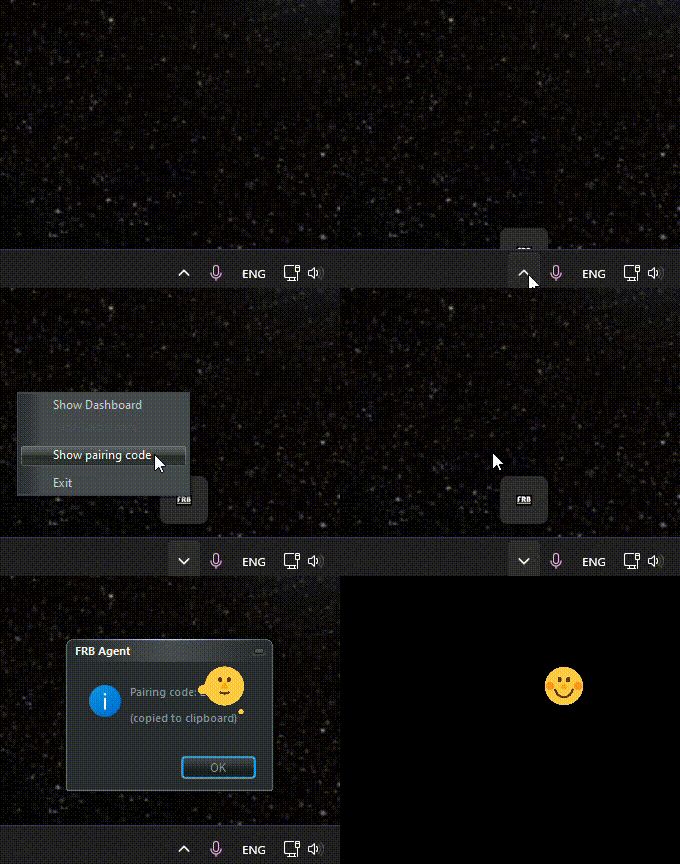
Find the pairing PIN
Find the six-character pairing PIN in FRB Agent. Enter it only in the matching official dashboard.
Example PIN Format
XXXXXXPair & Authorize
Sign in with your wallet using the message shown by the selected dashboard, then enter the agent PIN. A completed login does not confirm pairing or connection.
Connection status
After the pairing request is acknowledged, check the agent status in the dashboard. Do not treat navigation or a wallet login as an active connection.
Review the login message
Confirm the website and requested message in your wallet before signing. Never enter a seed phrase or private key on the website.
Next action
Pair the PIN in your selected dashboard
Keep the desktop agent open, then open the dashboard below and enter the 6-character PIN shown by the agent.
Pairing not working? Open support