Safe start journey
Go from trial to live telemetry in 4 steps
- 1NextDownload agentDownload the Windows installer and verify its published SHA-256.
- 2NextInstall and openRun the installer, then open FRB Agent and wait for the pairing PIN.
- 3NowPair deviceEnter the 6-character PIN in the correct chain dashboard.
- 4NextLaunch dashboardOpen the matching dashboard and confirm the agent connection before using an execution route.
Next recommended step
Download agent
Download the Windows installer and verify its published SHA-256.
We track progress locally so you can pick up where you left off.
Open Download agentAlready completed everything? Open the dashboard and start assigning node clients. Your trial unlocks Ops Pulse, Logs, and Alerts automatically.
Stage 3 of 4
Activate your FRB agent
Pair the Windows agent, approve a single wallet signature, and watch telemetry stream live inside /app.
Safety first: PIN-based pairing plus EIP-191 signatures replace all legacy Telegram flows.
Choose how to continue
New to FRB? Start with guided setup and Simulation Mode. If the agent is already installed, use the dashboard link inside your chosen network.
Launch FRB Agent
Start the FRB Agent application from your desktop. The agent initializes a secure local websocket for dashboard pairing.
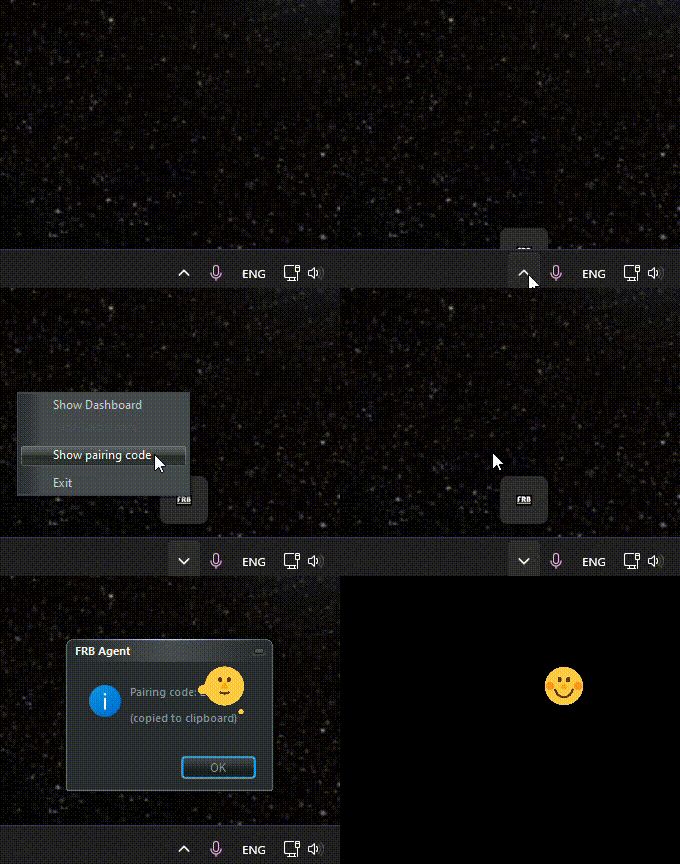
Secure Device PIN
The Windows app generates a unique 6-character identity PIN. This creates an encrypted bridge between your hardware and our interface.
Example PIN Format
XXXXXXPair & Authorize
Paste the PIN into the dashboard. FRB uses EIP-191 signatures for all state changes, eliminating the need for insecure Telegram bots.
Dashboard Sync
Instant socket connection via encrypted handshakes.
Zero-Trust Auth
All actions require hardware-encrypted signatures.
Next action
Pair the PIN in your selected dashboard
Keep the desktop agent open, then open the dashboard below and enter the 6-character PIN shown by the agent.
Pairing not working? Open support