Solana
Simulated route
$124.50 model
Example
Ethereum
Private bundle
$840.12 model
Example
BNB
Liquidation test
$45.20 model
Example
Base
Arbitrage test
$12.05 model
Example
Solana
Jito bundle
$310.00 model
Example
Polygon
Route check
$8.45 model
Example
Solana
Simulated route
$124.50 model
Example
Ethereum
Private bundle
$840.12 model
Example
BNB
Liquidation test
$45.20 model
Example
Base
Arbitrage test
$12.05 model
Example
Solana
Jito bundle
$310.00 model
Example
Polygon
Route check
$8.45 model
Example
ComplianceAwareness 阶段⏱ 7 分钟阅读

Best Wallet for MEV Traders 2026: Hardware, Hot, and Multi-Sig

**Answer first** — There's no single "best wallet" for MEV traders. The right answer is a **three-tier stack**: a **hardware wallet** (Ledger, Trezor, or Keystone) for cold treasur

Best wallet for MEV traders 2026 — hardware hot multi-sig architecture and recommendations
FR
FRB 团队MEV 专家
最近更新
#wallet#mev#security#hardware-wallet

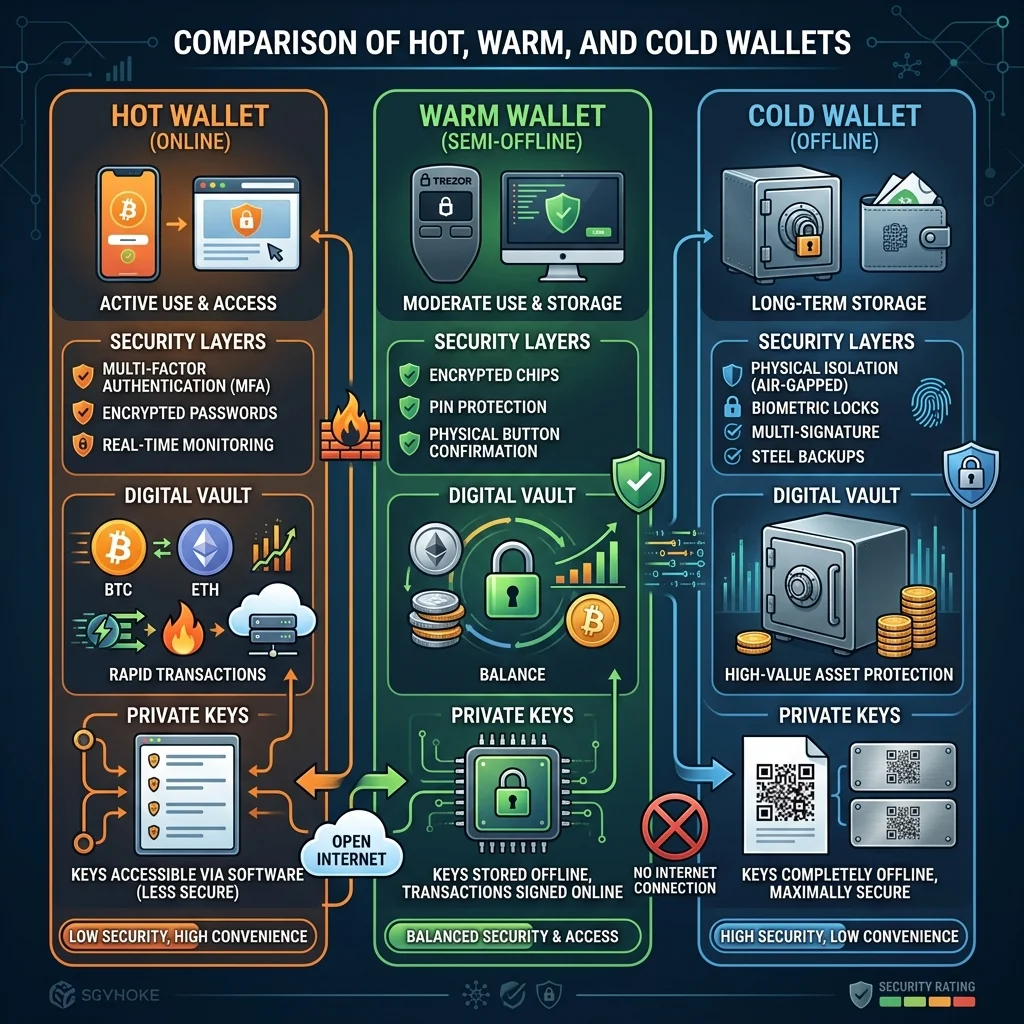
Answer first — There's no single "best wallet" for MEV traders. The right answer is a three-tier stack: a hardware wallet (Ledger, Trezor, or Keystone) for cold treasury holding long-term reserves; a dedicated hot wallet (a fresh seed on Rabby, MetaMask, or Phantom, used only for the bot) holding only the working capital for the next 24–48 hours of trading; and a multi-sig (Safe on EVM, Squads on Solana) for any pooled or team-managed funds. The single biggest mistake MEV traders make is using one wallet for everything — one operational slip drains the entire stack.

Why MEV Trading Demands A Wallet Stack

Most crypto users get away with one wallet because their transaction count is low and their approval surface is narrow. MEV trading inverts both:

  • Transaction count: Hundreds to thousands per week. Each transaction is an attack surface — a malicious contract, a malformed signature prompt, a phishing pop-up that loads from a compromised RPC.
  • Token approvals: Every DEX router and aggregator you interact with gets an ERC-20 approval. A single drainable approval on a long-tail router can be triggered months later.
  • Bot integration: Your trading bot needs the private key (or session key) to sign. This key lives on the same machine as your browser, email, and download history.

Combine these: an MEV trader using one wallet is exposing their entire net worth to operational risk that's an order of magnitude higher than a normal user's. The solution is role separation — different wallets for different jobs, with each holding only what it needs.

Tier 1: The Hardware Wallet (Cold Treasury)

This wallet holds 70%+ of your crypto net worth and signs transactions roughly once a month, never via a bot.

Recommendations for 2026:

Device Strengths Weaknesses
Ledger Nano X / Stax Most-supported, EVM + SOL + many chains, mature firmware Closed firmware (trust assumption); 2023 Ledger Recover saga still informs trust calculus
Trezor Model T / Safe 3 Open firmware, transparent Less coin coverage, slightly clunkier UX
Keystone 3 Pro Air-gapped (QR-only), open firmware No live USB connection; more friction
GridPlus Lattice1 Programmable safe-card model, strong UX for active users Higher price point

Best practice: two hardware wallets from different manufacturers, with the second held in a separate physical location as a recovery backup of the same seed. Don't put your only hardware device in your daily-carry bag.

The hardware wallet never connects to your trading bot. It signs only when you manually approve a transfer from cold to hot.

Tier 2: The Dedicated Hot Wallet (Bot Execution)

This wallet holds only the working capital for 24–48 hours of trading — enough to run the bot, not enough to ruin you if compromised.

Setup rules:

  1. Fresh seed, generated specifically for the bot. Not derived from any existing wallet you use elsewhere.
  2. No browser extension if avoidable. If the bot has a private-key import option, store the key in the bot's encrypted config and never paste it into a browser extension wallet.
  3. Topped up on a schedule, not pre-funded with 30 days of capital. If your strategy needs $20k/day in working capital, hold $25k in the hot wallet, refilled every 2 days from cold storage.
  4. Address allowlist where supported. Your bot should only be able to interact with contracts on a whitelist (DEX routers, lending markets, your own contracts). Block-by-default for everything else.

Software recommendations for the hot wallet (when one is needed):

Wallet Why It's Good for Hot Use
Rabby (EVM) Best simulation pre-sign; warns on dangerous approvals; multi-chain native
Phantom (SOL) Best Solana UX; built-in security warnings; supports session signing
Frame (EVM) Local-only, no cloud sync; clean for power users
Foundry's cast wallet (CLI) Pure CLI for fully scripted setups; no GUI attack surface

What to avoid as the hot wallet:

  • MetaMask with snaps enabled from untrusted authors — snaps have full transaction-signing access
  • Any wallet whose seed is stored in a cloud-backed file (iCloud, Google Drive) without an additional encryption layer
  • Wallets that auto-update on a schedule without your explicit approval (a malicious update is the cleanest supply-chain attack)

Tier 3: Multi-Sig (Treasury / Team / Pooled Funds)

If you trade with capital that's not 100% yours, or if you want institutional-grade security on the treasury layer, multi-sig is mandatory.

Recommendations:

  • Safe (Gnosis Safe) on EVM chains — the default. Battle-tested, integrates with most DeFi, supports a wide range of modules.
  • Squads on Solana — equivalent. Best-in-class Solana multisig in 2026.
  • Avoid roll-your-own multisig contracts. The bugs in custom multisigs have lost more money than any other DeFi attack vector aside from oracle manipulation.

Configuration heuristics for a trading-team multisig:

  • 2-of-3 for small teams (you + co-founder + recovery key in a safe)
  • 3-of-5 for larger pools (signers in different physical locations, time-delayed alerts on proposal creation)
  • Module-restricted spend limits — the multisig allows up to $X/day to a whitelisted hot wallet without full quorum, with full quorum required for anything above that or to non-whitelisted destinations

The "Hardware Wallet As Hot Wallet" Compromise

Some MEV traders use a hardware wallet as the bot's signing device, hoping to get cold-wallet security without the role separation. This works in narrow cases:

  • The bot only signs once per minute or slower
  • You're physically present to confirm each transaction on the device
  • The trading is low-frequency arb, not high-frequency sniping

It does not work for MEV-grade execution where a sandwich opportunity needs to sign in milliseconds. Hardware wallets aren't fast enough, and you can't sit there confirming hundreds of transactions a day.

If your strategy genuinely needs hardware-wallet-level security per signature, you're not doing MEV — you're doing manual trading. They're different activities.

Operational Hygiene Rules

Regardless of which wallets you choose, these rules don't change:

  1. Separate the machine. The trading bot runs on a dedicated machine (or VM) with no email, no social media, no browser extensions other than what's strictly required. See Windows Crypto Trading Bot Setup Guide.

  2. Revoke approvals quarterly. Use revoke.cash, Etherscan's token approvals page, or your wallet's built-in revoke feature to clean up stale approvals every 90 days. This single habit prevents the most common "I had a small approval on a long-forgotten contract" drain.

  3. Monitor the hot wallet. Set up an on-chain alert (Tenderly, Forta, or a simple webhook) that fires if your hot wallet's ETH/SOL balance changes by more than the expected per-block delta. Catches drains within minutes, not hours.

  4. Cycle the hot wallet seed annually. Even with good hygiene, hot keys are exposed to your machine and to every contract you've interacted with. Rotating the seed yearly and migrating funds is cheap insurance.

  5. Never type your seed. Seeds enter your wallet through the hardware device or via the wallet app's import flow, never typed into a browser, never pasted from a clipboard, never photographed.

See Crypto Trading Bot Security Best Practices for the bot-side companion to this wallet-side hygiene.

What FRB Agent Expects

FRB Agent is non-custodial — keys live on the user's machine, the agent signs locally, no FRB-controlled wallet holds funds. The agent supports:

  • Imported private keys (encrypted at rest with a user-set password)
  • Hardware wallet signing (Ledger via WebUSB / native HID) — slower but useful for treasury operations
  • Multi-account configuration — separate wallets for separate strategies, each with isolated balances

The recommended setup for FRB Agent operators mirrors the three-tier stack above: hardware wallet for cold reserves, a dedicated software wallet (fresh seed) imported into the agent for execution, and Safe/Squads for any team-held funds.

What the agent does not do: act as a custodian, share keys with any FRB server, or sweep user funds. The keys never leave the user's machine. This is the structural reason multi-tier wallets matter — non-custodial means the user's hygiene is the security.

Common Mistakes To Avoid

  • One wallet for trading, holding, and DeFi. The fastest way to lose everything.
  • Importing a hardware-wallet seed into a software wallet "just for one transaction". The seed is now exposed forever. Treat it as compromised.
  • Trusting a wallet because it's popular. MetaMask snaps, Phantom plugins, and similar extensibility models have introduced supply-chain risks. Popularity is not a security audit.
  • Storing seeds in password managers. Better than typing into Notes, but worse than a hardware device backup. If the password manager is breached, the seed is gone.
  • Pre-funding hot wallets with months of capital. Reduce blast radius — top up frequently from cold.

Quick Decision Matrix

Your Setup Recommended Wallet Stack
Solo retail, < $5k working capital Hardware (cold) + fresh hot wallet for bot
Solo professional, $5k–$100k Hardware + hot + revoke-discipline + monitoring
Solo professional, $100k+ Two hardware devices + hot + 2-of-3 Safe + monitoring
Team / pooled funds Hardware per principal + per-strategy hot + 3-of-5 Safe with module-restricted spend
Institutional Add cold-storage MPC custody (Fireblocks, Copper, Anchorage) + the above

Further Reading

阅读后的下一步

启动 FRB 控制台

连接您的钱包,通过 6 位 PIN 码配对节点客户端,然后分配上述合约。

需要安装程序?

下载并验证 FRB

获取最新安装程序,将 SHA‑256 与 Releases 对比,然后按照安全启动清单操作。

查看 Releases 和 SHA‑256
分享𝕏 推特in LinkedInf Facebook

相关文章

延伸阅读与工具

讨论

暂无笔记。添加第一条观察,或在以下平台与团队分享链接 X (@MCFRB).

留下笔记
笔记仅存储在您的本地浏览器中。

掌控脉动

扩展您的执行能力

通过探索完整的 FRB 工具包来最大化您的优势。从机构级遥测到随时可导出的策略脚本。

CTA

安装 FRB 代理

下载经过验证的 Windows 版本并检查 SHA-256。

CTA

阅读快速入门文档

与运营和合规团队分享 15 分钟的设置流程。

CTA

启动控制面板

配对节点客户端并实时监控 Ops Pulse。

准备进化了吗?

迈出下一步

无论您是在验证终端安全,还是在启动您的第一个交易包,FRB 之旅都从这里开始。

推荐

安装 FRB 代理

安全的 Windows 版本,通过 SHA-256 验证以确保最高完整性。

推荐

阅读快速入门文档

15 分钟掌握设置流程:从钱包配对到第一个交易包。

推荐

启动控制面板

实时监控您的 Ops Pulse 并管理交易路由。